
Talend ESB RESTful Service
10:40 AM
This post is in continuation with Realtime Response using Talend ESB, here I will show you how to create and run simple REST API.
To create MyFirstAPI job I have used TOS ESB v.6.1.1
tRESTRequest_1 will receive a GET request from browser using REST Endpoints and URI pattern
"http://localhost:8088/talend/{action}" where action is the query parameter which could be anything and we can get value from URI using this query parameter to perform certain logic on server.
In this simple example I am using this query parameter {action} to determine valid/invalid response of API.
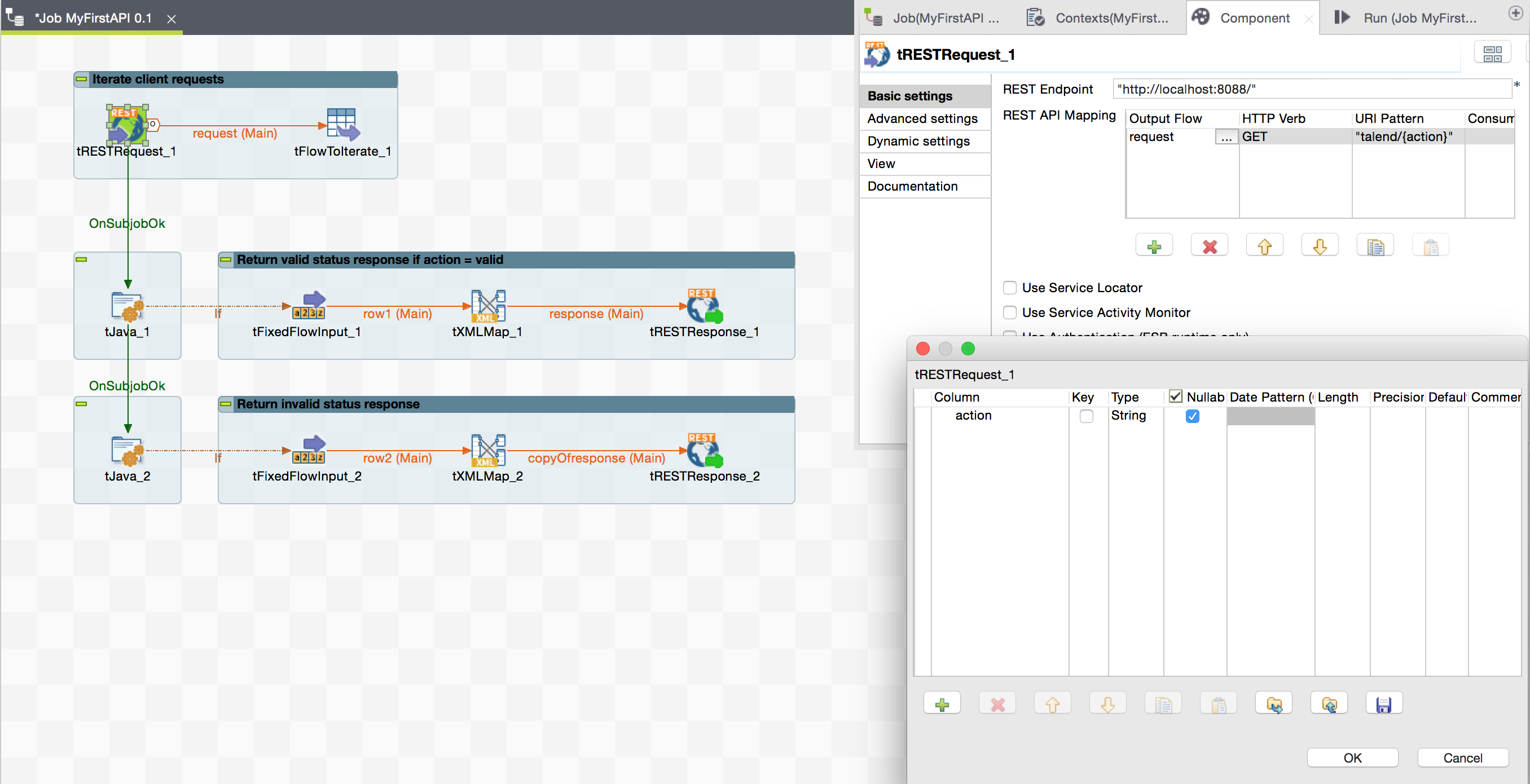 tFlowToIterate will load a global map variable "requestAction" from the request url.
 If1 will send Valid response only when globalMap requestAction is equals to valid.
 In tFixedFlowInput > Edit Schema
Create Columns status and message and set status values as "valid" and message value as "Request is Valid".
In tFixedFlowInput > Edit Schema
Create Columns status and message and set status values as "valid" and message value as "Request is Valid".
 In tXMLMap pass status and message to root Element of response.
 In tRESTResponse set Return Body Type as Document and Return Status Code as OK(200)
 Now check for any other action to send invalid response paste below condition in If2.
 Now Run job and Talend ESb will open endpoint from tRESTRequest.
http://localhost:8088/
Now Run job and Talend ESb will open endpoint from tRESTRequest.
http://localhost:8088/
 You can call MyFirstAPI job using REST endpoint and URL Pattern from web browser.
http://localhost:8088/talend/valid
You can call MyFirstAPI job using REST endpoint and URL Pattern from web browser.
http://localhost:8088/talend/valid

tFlowToIterate will load a global map variable "requestAction" from the request url.
If1 will send Valid response only when globalMap requestAction is equals to valid.
((String)globalMap.get("requestAction")).equals("valid") !((String)globalMap.get("requestAction")).equals("valid")
And in tFixedFlowInput_2 set status as "invalid" and message as "Request is invalid"
Now Run job and Talend ESb will open endpoint from tRESTRequest.
http://localhost:8088/
You can call MyFirstAPI job using REST endpoint and URL Pattern from web browser.
http://localhost:8088/talend/valid

0 comments