
All System routines are read only and has static methods that is why we are able to call all system methods with the class_name.method_name({arg},{arg2},...)
But to leverage full power of java in Talend platform we must know how to create routines with non static methods and how to create objects to call non static methods within Talend routines and in Job design.
Below example will demonstrate how to create a routine with non static methods and call non static methods in CalcUtil by creating objects of Calc Class.
Click Code > Routines > Create routine
// Routine : Calc

package routines;

public class Calc {
 private static int a=0;
 private static int b=0;

 Calc()
 {
   a=0;
   b=0;
 }
 Calc(int a,int b)
 {
   a=0;
   b=0;
 }

 public static int getA() {
  return a;
 }

 public static void setA(int a) {
  Calc.a = a;
 }

 public static int getB() {
  return b;
 }

 public static void setB(int b) {
  Calc.b = b;
 }

 public int addition()
 {
  return a+b;
 }
 public int subtract()
 {
  return a-b;
 }
 public int multiply()
 {
  return a*b;
 }
 public int divide()
 {
  return a/b;
 }
}
Click Code > Routines > Create routine
// Routine : CalcUtil

package routines;

import routines.Calc;

public class CalcUtil {

 public static int add(int num1,int num2){
  Calc c = new Calc();
  Calc.setA(num1);
  Calc.setB(num2);
  return c.addition();
 }
 public static int sub(int num1,int num2){
  Calc c = new Calc(num1,num2);
  return c.subtract();
 }

}
Note* :
SetA and setB are static methods of Calc routine and we are setting values by calling methods with class name.
Calc.setA(num1);
Calc.setB(num2);
Addition and subtract are non static methods to call non static methods we have created object of class Calc and called method using object.
Calc c = new Calc();
c.addition();
c.subtract();
Click Job Designs > Create job
Move tJava component from palette to designer and paste below print statement in code area of tJava.
System.out.println("Add 3+2="+CalcUtil.add(3,2));
System.out.println("Sub 3-2="+CalcUtil.sub(3,2));

- 10:54 AM
- 0 Comments


 But for me I was comfortable with old straight lines like we have in TOS V5.3.0
To get straight lines click Windows >Preferences > Talend >Appearances> Designer
Uncheck Use curved connection style for Job Designer
But for me I was comfortable with old straight lines like we have in TOS V5.3.0
To get straight lines click Windows >Preferences > Talend >Appearances> Designer
Uncheck Use curved connection style for Job Designer
 Click ok, close and open job again.

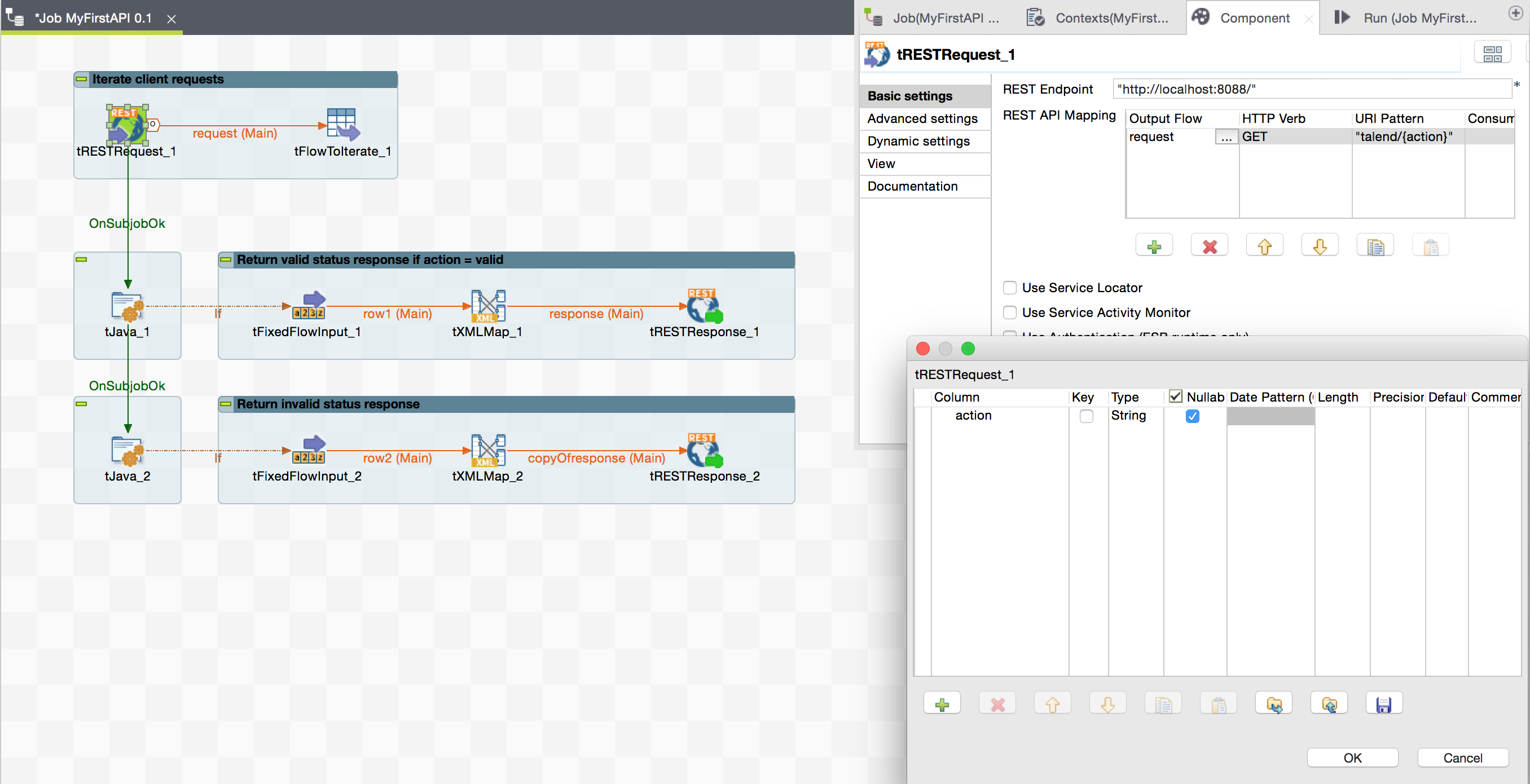 tFlowToIterate will load a global map variable "requestAction" from the request url.
 If1 will send Valid response only when globalMap requestAction is equals to valid.
 In tFixedFlowInput > Edit Schema
Create Columns status and message and set status values as "valid" and message value as "Request is Valid".
In tFixedFlowInput > Edit Schema
Create Columns status and message and set status values as "valid" and message value as "Request is Valid".
 In tXMLMap pass status and message to root Element of response.
 In tRESTResponse set Return Body Type as Document and Return Status Code as OK(200)
 Now check for any other action to send invalid response paste below condition in If2.
 Now Run job and Talend ESb will open endpoint from tRESTRequest.
http://localhost:8088/
Now Run job and Talend ESb will open endpoint from tRESTRequest.
http://localhost:8088/
 You can call MyFirstAPI job using REST endpoint and URL Pattern from web browser.
http://localhost:8088/talend/valid
You can call MyFirstAPI job using REST endpoint and URL Pattern from web browser.
http://localhost:8088/talend/valid

 As both Data Integration studio and ESB studio support same components for data Integration I did not need to do any re-design for the logic in reading and writing data. Now in ESB I just need to wrap my ETL logic inside a RESTful web service which can be called from web browser with client specific parameters and can return response back in realtime.
 Above snapshot has the request made to the dummy RESTful web service MyFirstAPI using Talend ESB.
 In MyFirstAPI job I have used tRESTRequest to receive a request from browser using url pattern "talend/{action}" where action can be anything but job will return valid status only when action is valid. And using tFlowToIterate we can iterate request from clients and perform ETL specific to clients or actions.
I will try to cover how to create and deploy Talend ESB RESTful web service in Runtime environment in my future posts.
Please let me know your views I hope the above is useful to you.
In MyFirstAPI job I have used tRESTRequest to receive a request from browser using url pattern "talend/{action}" where action can be anything but job will return valid status only when action is valid. And using tFlowToIterate we can iterate request from clients and perform ETL specific to clients or actions.
I will try to cover how to create and deploy Talend ESB RESTful web service in Runtime environment in my future posts.
Please let me know your views I hope the above is useful to you.
